
Once your voting campaign is active and people start voting, you will begin to earn from successful votes. Packet Africa allows you to easily request payouts from your earnings directly from your dashboard.
This guide shows you how to view your earnings and request a payout.
Step 1: Log into Your Dashboard
- Go to https://app.packetafrica.com/dashboard
- Log in with your account details.
Step 2: Open the Voting Section
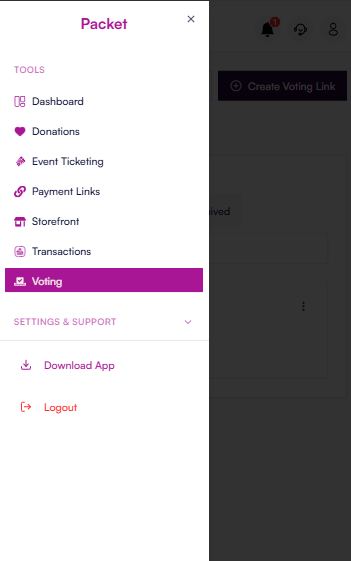
- On the left sidebar, under TOOLS, click Voting.
Step 3: Select Your Voting Campaign
- From your list of voting campaigns, click on the campaign you want to withdraw from.
You will land on the Results tab by default.
Step 4: View Your Earnings Summary
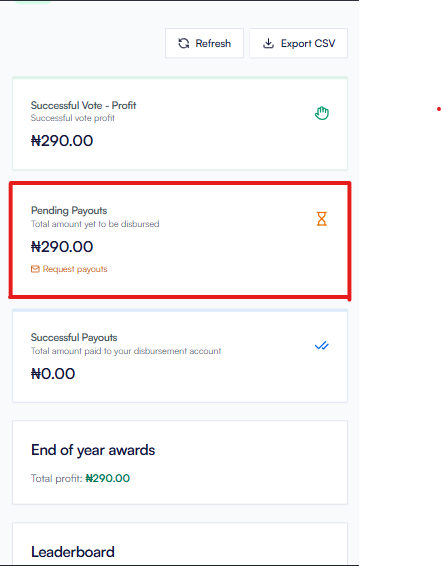
On the Results page, you will see three summary cards:
- Successful Vote – Profit
Total profit from successful votes - Pending Payouts
Total amount available for withdrawal
Request payouts ← Click this link - Successful Payouts
Total amount already paid to your disbursement account
Step 5: Request Your Payout
- Under the Pending Payouts card, click the Request payouts link.
A popup modal will appear.
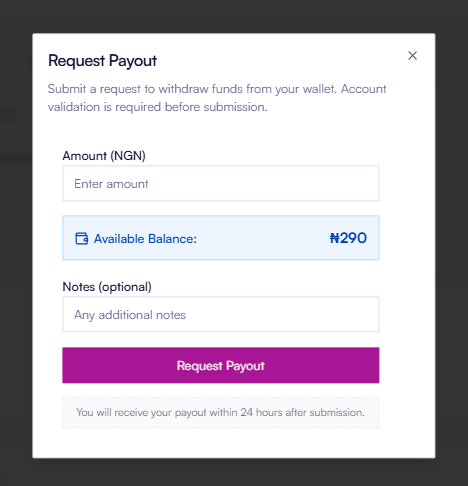
In the modal you will see:
- Amount (NGN) — Enter the amount you want to withdraw
- Available Balance — Shows how much you currently have available
- Notes (optional) — Add any message or reference if needed
- Purple Request Payout button
- Enter the amount you want to request.
- (Optional) Add a note.
- Click the Request Payout button.
Note: Account validation is required before your first payout request can be processed.
What Happens After You Submit?
- You will receive a confirmation that your request has been submitted.
- All payout requests are processed within 24 hours.
- Once processed, the amount will move from Pending Payouts to Successful Payouts, and the funds will be sent to your registered disbursement account.
Important Things to Know
- You can only request payouts up to your Available Balance.
- Payout requests are reviewed and processed within 24 hours (not after 24 hours).
- Make sure your disbursement account details are correctly set up in your profile/settings before requesting a payout.
- You can request partial or full amounts from your pending balance.
Still Need Help?
If you don’t see the Request payouts option, or if you encounter any issues while requesting a payout, please contact our support team through the in-app chat or reply to this article.